

Applied Ergonomics · 90-second self-check
Test Yourself: The Wrist Check
Your wrist is happiest when it's neutral — straight and untwisted, the way it sits when you reach out to shake hands. Both typing and mousing pull it out of neutral, in three ways. This check walks each one — for keyboard and mouse alike — and shows you what may help.
Before you start
It takes about 90 seconds and just your hands
No equipment needed. You'll feel out three positions, answer a few short questions, and get a personalized read with practical next steps. Sit at your desk if you can.
The three ways a wrist leaves neutral
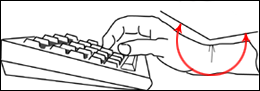
1. Rotation — the forearm turns the palm down toward the desk. 2. Side-to-side — the wrist bends outward toward the pinky (called ulnar deviation). 3. Up-and-down — the wrist cocks upward. Each has a different cause and a different fix, so we test them separately. And it isn't only the keyboard — a flat mouse forces the same palm-down twist, and a mouse set off to the side forces a reach, which is exactly why vertical and centered mice matter as much as the right keyboard.
Find your baseline
This is neutral
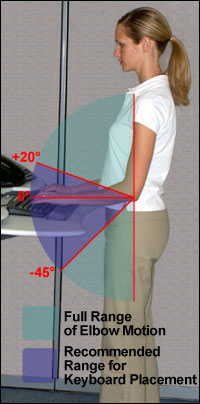
Hold your dominant hand out in front of you, thumb up, as if you're about to shake hands, elbow near your side. The forearm isn't twisted, the wrist is straight. This relaxed position is the one we want to protect.
Test 1 · Rotation
Turn your palm down to type
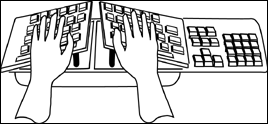
From the handshake, slowly rotate your forearm so your palm faces down toward the desk — what a flat keyboard and a standard mouse ask for. Move slowly and notice any tension building in the wrist or forearm.
Question 1
As you rotated palm-down, when did you notice tension or pressure?
Test 2 · Side-to-side
Now the sideways bend
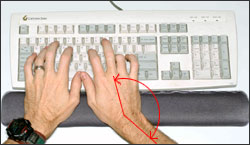
Rest both hands on your keyboard as if typing. Look down. Do your wrists have to angle outward toward the pinky — hands splaying into a wide "V" — to line your fingers up with the keys?
This is ulnar deviation
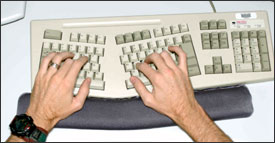
Most keyboards are wider than your shoulders, so to reach the keys your elbows stay in while your hands angle outward toward the pinky. Holding that sideways bend while typing loads the wrist tendons and crowds the carpal tunnel. The fix is a keyboard that lets each hand point straight ahead — a split keyboard (each half angled to your forearm), an angled keyboard, or simply a narrower one.
Question 2
To line up with your keys, do your wrists bend outward toward the pinky?
Test 3 · Up-and-down
While typing, what do your wrists do?
Question 4 · Your mouse
With your hand resting as if mousing, is your hand or forearm tense or pinching?
A standard mouse holds the hand palm-down — the same forced rotation as a flat keyboard — so the mouse is just as likely to be the culprit. Rest your hand on your mouse and notice how it feels.
Question 5
When typing and mousing, where are your elbows?
What your answers point to
One more thing: how hard you hit the keys
Posture is half the story — force is the other half. "Bottoming out" (slamming each key to its floor) sends impact into your fingertips and tendons all day. A switch that signals early — a crisp scissor pressure point or a mechanical tactile bump, like the old IBM Selectric's confident snap — lets you type lighter. See the key-feel primer →
Want a second set of eyes?
Getting the right keyboard, mouse, and setup to a specific body is still an art that benefits from testing. Applied Ergonomics does exactly this — one person or a whole floor.
Jeff Meltzer, President · 847-679-5148 ×101 · jmeltzer@appliedergonomics.com
Please note: This is an educational self-check, not medical advice or a diagnosis. Wrist and hand conditions such as carpal tunnel syndrome and tendinitis have many possible causes and can't be identified by a self-test. The equipment and adjustments suggested here may help relieve everyday discomfort for some people, but results vary. If you have pain, numbness, tingling, or weakness, please consult a qualified healthcare professional.
Illustrations: OSHA Computer Workstations eTool (U.S. Department of Labor) — public domain.
© Applied Ergonomics · appliedergonomics.com